
SPECIAL PROMOTION — Up to 40% off across many product groups, until 31 December 2026 · Click to see all promotion itemsIFM, Sensor, Automation SystemMeasuring / Testing InstrumentsTemp Indicator, Control, T/C, RTD, TimerHeater, SCR Control, Solid State, Power Supply, Control CabinetField Measuring Instruments, Pressure Gauge, Level Control, Flow MeasurementEMC, Pneumatic, Solenoid ValveInspection Test Lamp, Head Light, Automotive Measuring InstrumentWeighing Scales, Marking Machine, PrintersEducational Training SystemsHot Line Tools & Equipment SPECIAL PROMOTION — Up to 40% off across many product groups, until 31 December 2026 · Click to see all promotion itemsIFM, Sensor, Automation SystemMeasuring / Testing InstrumentsTemp Indicator, Control, T/C, RTD, TimerHeater, SCR Control, Solid State, Power Supply, Control CabinetField Measuring Instruments, Pressure Gauge, Level Control, Flow MeasurementEMC, Pneumatic, Solenoid ValveInspection Test Lamp, Head Light, Automotive Measuring InstrumentWeighing Scales, Marking Machine, PrintersEducational Training SystemsHot Line Tools & Equipment View promotion items View all
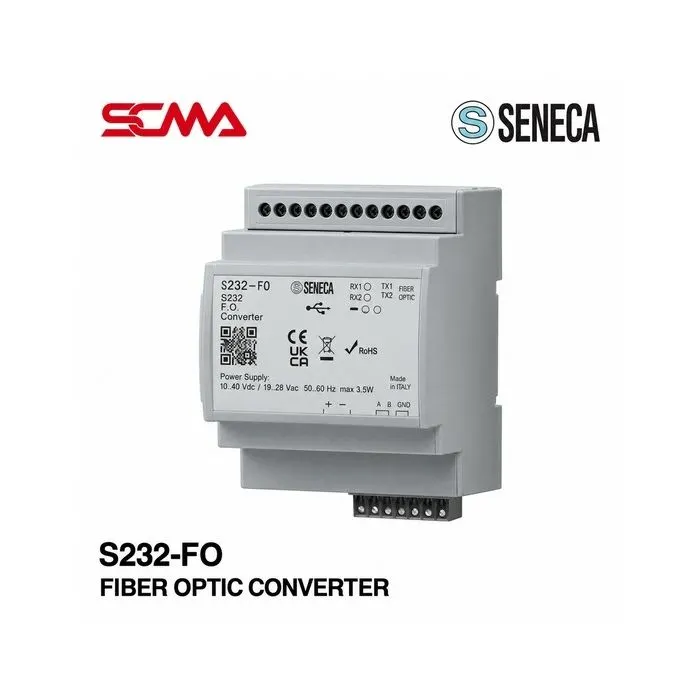
S232-FO FIBER OPTIC CONVERTER SENECA
Price on request – please contact us
Out of stock
SKU
050957
Out of stock

S232-FO, SENECA, Fiber Optic Converter, RS232 to Fiber Optic Converter, RS232 Fiber Converter, Serial to Fiber Optic Converter, Optical Fiber Converter, Industrial Fiber Optic Converter, RS232 Serial Communication, Single Mode Fiber Optic, Multimode Fiber Optic, Single Loop, Double Loop, Optical Communication, Fiber Optic Communication Module, Industrial Serial Converter, Modbus RTU, DIN Rail Fiber Converter, 1200 to 115200 bps, Industrial Automation, Fiber Optic Converter, RS232 Fiber Optic Converter, RS232 to Fiber Optic Converter, Serial Fiber Optic Converter, Optical Communication Device, Serial Communication Converter, Industrial Fiber Optic Converter, Optical Fiber Communication Device, SENECA Communication Device, Industrial Automation Communication Device, PLC Communication Device
*Price does not include VAT
SENECA S232-FO Fiber Optic Converter (RS232 to Fiber Optic Converter)
The SENECA S232-FO Fiber Optic Converter is a device that converts RS232 communication signals into optical fiber signals and back to RS232 signals when used with compatible receiving equipment. This allows for the connection of serial communication devices in control systems and industrial automation systems through an optical fiber network.
The S232-FO supports use with either Single-mode or Multimode optical fibers, along with Single Loop or Double Loop configurations based on sub-model codes. It features optically isolated RS232 interfaces and supports data transfer rates from 1,200 to 115,200 bps.
This equipment is ideal for communication tasks in industrial plants, PLC systems, and control systems that require optical fibers to reduce the impact of electromagnetic interference on signal transmission paths. It's important to select the appropriate fiber type, connectors, and network structure according to the sub-model being used.
General Features
- Brand: SENECA
- Model: S232-FO
- Type of Product: Fiber Optic Converter
- Converts RS232 communication signals to optical fiber signals
- Suitable for Single-mode or Multimode fibers based on sub-model
- Supports Single Loop or Double Loop configurations based on sub-model
- Data transfer rate support: 1,200-115,200 bps
- Supports Modbus RTU and transparent data transmission for supported communication protocols
- Includes optical fiber communication status lights, serial communication status lights, and device status lights
- Includes built-in device status diagnostic system
- Suitable for DIN Rail mounting
- Designed for industrial communication and automation control systems
Technical Specifications (Technical Specifications)
| Brand | SENECA |
| Model | S232-FO |
| Product Type | RS232 to Fiber Optic Converter |
| Communication Interface | 1 x RS232, Optoisolated |
| Fiber Optic Type | Single-mode / Multimode (Depending on Version) |
How It Works
The S232-FO Signal Converter receives data from communication devices through the RS232 interface and then converts it into optical signals to transmit over fiber optic cables to another signal converter, which in turn converts the optical signals back into communication data for the destination device.
Communicating through fiber optic cables reduces electromagnetic interference along the way and is suitable for applications where data needs to be transmitted between separately installed control devices. However, performance and distance depend on the sub-model, type of cable, and actual installation.
Sub-Models and Connection Types
| S232-FO-MONO-SL | Single-mode Fiber / Single Loop |
| S232-FO-MONO-DL | Single-mode Fiber / Double Loop |
| S232-FO-MULTI-SL | Multimode Fiber / Single Loop |
| S232-FO-MULTI-DL | Multimode Fiber / Double Loop |
The MONO sub-model uses LC fiber connectors and has a maximum communication distance of 10 kilometers according to the manufacturer's specifications. The MULTI sub-model uses ST/ST connectors and has a maximum communication distance of 2 kilometers. These figures are specific to each sub-model type and not uniform across all models.
Installation and Usage
- Check the sub-model code to select the correct fiber cable type and communication mode
- Install the device on a DIN Rail within an appropriate control cabinet
- Connect the RS232 interface to the control devices as per the manufacturer's wiring diagram
- Connect the optical fiber cable to the selected sub-model connector
- Supply power within the specified voltage range of 12-35 VDC or 8-24 VAC
- Configure communication settings to match those of the RS232 source and destination devices
- Set up MONO models through SENECA Compositor software, or MULTI models via DIP Switches as per the manual
- Check the communication status and device diagnostics before actual use
Examples and Usage Guidelines
- Connect RS232 devices between separately installed control cabinets through optical fiber cables
- Use in communication systems between PLCs and industrial equipment supporting RS232
- Apply in machine control and remote measurement systems
- Use in communication systems requiring reduced electromagnetic interference impact
- Operate in Automation, Industrial Monitoring, and factory communication systems
Considerations
- S232-FO is a RS232 to Fiber Optic signal converter, not an RS485, Ethernet or CAN Converter
Write Your Own Review
This website uses cookies
We use cookies to make the site work properly, to understand how it is used, and to show content that is relevant to you. You choose which types to allow; strictly necessary cookies are always on. Privacy Policy
🤖 AI Assistant
Ask about products, specs and replacement models
Hello 👋 Ask us anything — find products, compare specs, or troubleshoot.
🗑 Clear history