
SPECIAL PROMOTION — Up to 40% off across many product groups, until 31 December 2026 · Click to see all promotion itemsIFM, Sensor, Automation SystemMeasuring / Testing InstrumentsTemp Indicator, Control, T/C, RTD, TimerHeater, SCR Control, Solid State, Power Supply, Control CabinetField Measuring Instruments, Pressure Gauge, Level Control, Flow MeasurementEMC, Pneumatic, Solenoid ValveInspection Test Lamp, Head Light, Automotive Measuring InstrumentWeighing Scales, Marking Machine, PrintersEducational Training SystemsHot Line Tools & Equipment SPECIAL PROMOTION — Up to 40% off across many product groups, until 31 December 2026 · Click to see all promotion itemsIFM, Sensor, Automation SystemMeasuring / Testing InstrumentsTemp Indicator, Control, T/C, RTD, TimerHeater, SCR Control, Solid State, Power Supply, Control CabinetField Measuring Instruments, Pressure Gauge, Level Control, Flow MeasurementEMC, Pneumatic, Solenoid ValveInspection Test Lamp, Head Light, Automotive Measuring InstrumentWeighing Scales, Marking Machine, PrintersEducational Training SystemsHot Line Tools & Equipment View promotion items View all
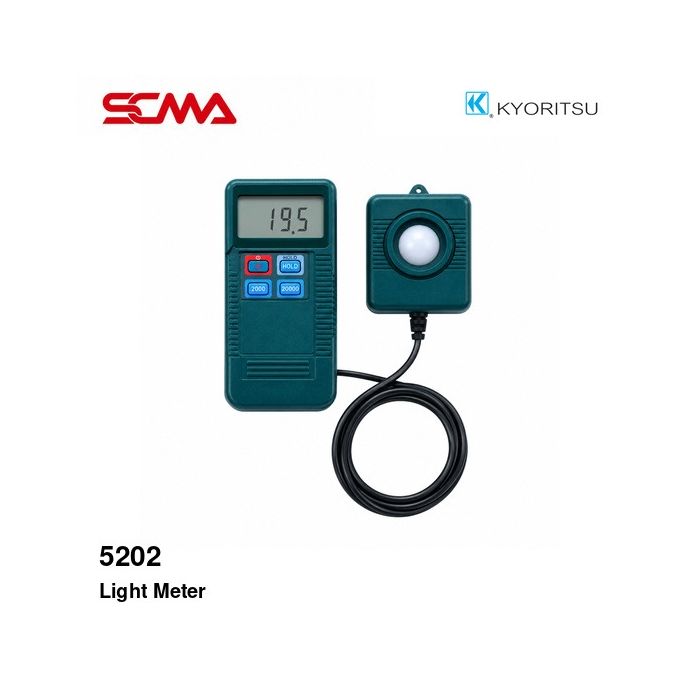
5202 LIGHT METER KYORITSU
Price on request – please contact us
Out of stock
SKU
050972
Out of stock

Model 5202, KYORITSU Digital Light Meter, Light Meter, Lux Meter, Illuminance Meter, Digital Lux Meter, Light Intensity Meter, Measurement Range: 0.1-19990 Lux, 200 Lux, 2000 Lux, 20000 Lux, 3 Measurement Ranges, Separate Light Sensor, Silicon Photodiode Sensor, Data Hold, Zero Adjustment, 2.5 Measurements per Second, JIS C1609 Class A Spectral Response, Powered by 9V Battery, Suitable for Lighting Inspection, Workplace Lighting Measurement, Industrial Lighting Measurement, Building Lighting Inspection, Light Meter, Digital Light Meter, Lux Meter, Illuminance Meter, KYORITSU Light Meter Model 5202, Separate Sensor Light Meter, Factory Light Meter, Building Light Meter, Worksite Lighting Inspection Tool, Industrial Lighting Measurement Instrument
*Price does not include VAT
KYORITSU 5202 Digital Light Meter (Lux Meter)
KYORITSU MODEL 5202 Digital Light Meter is a digital light meter (Lux Meter) for measuring illuminance levels inside buildings, offices, industrial plants, and various work areas. It has a measurement range from 0.1 to 19,990 Lux, making it suitable for checking lighting conditions and evaluating the efficiency of lighting systems.
The device allows selection of three measurement ranges: 200, 2,000, and 20,000 Lux, which are appropriate for different levels of illumination. It comes with a separate light sensor head that makes positioning the measuring head and reading values on the display easier.
The model 5202 uses a Silicon Photodiode light sensor and features a Data Hold function to keep displayed readings constant. It also has an auto-zero adjustment system, capable of responding approximately 2.5 times per second, along with an LCD screen for easy reading of measurements.
It operates on one 9V battery and is compact in size, making it ideal for general lighting inspections, maintenance of electrical lighting systems, and environmental condition monitoring during work.
General Features
- Brand: KYORITSU
- Product Model: MODEL 5202
- Product Type: Digital Light Meter / Lux Meter
- Luminance Measurement Range: 0.1-19,990 Lux
- Selectable measurement ranges of 200 / 2,000 / 20,000 Lux
- Light sensor type: Silicon Photodiode
- The light sensor head is detachable from the main unit for ease of use
- Data Hold function to keep displayed readings constant
- Auto-zero adjustment system (Zero Adjustment)
- Response speed approximately 2.5 times per second
- Digital LCD display screen
- Battery low warning and out-of-range indication symbols
- Uses one 9V battery type 6F22
- Suitable for checking lighting systems in buildings and industrial plants
Technical Specifications (Technical Specifications)
| Brand | KYORITSU |
| Model | 5202 |
| Product Type | Digital Light Meter |
| Measurement Parameter | Illuminance |
| Measurement Range | 0.1-19,990 Lux |
How It Works
The KYORITSU 5202 Lux Meter uses a Silicon Photodiode sensor to detect incident light, converting the light energy into an electrical signal. The internal circuit then processes and displays the illuminance value on the LCD screen in units of Lux.
The sensor head separation from the main unit allows users to place the sensor head on the measurement surface appropriately, while holding the main unit conveniently for reading values.
The device supports manual range selection with three levels. Users should select an appropriate range based on lighting conditions to ensure accurate readings within that range's resolution.
Functionality
- Illuminance Measurement: Measures illuminance in Lux units
- Manual Range Selection: Selects measurement ranges of 200 / 2,000 / 20,000 Lux
- Data Hold: Keeps the displayed value on screen for easy note-taking
- Zero Adjustment: Adjust zero according to manufacturer's instructions before starting measurements
- Low Battery Indication: Alerts when battery level is low
- Overrange Indication: Indicates status when light levels exceed the set range
Usage and Measurement
- Check the condition of the main unit and sensor head before use
- Check the readiness of the 9V battery
- Turn on the device and select an appropriate measurement range based on expected lighting conditions
- Adjust zero according to manufacturer's instructions when necessary
- Remove the sensor head cover before starting measurements
- Place the sensor on the surface for measurement, avoiding blocking light with your body
- Wait until the reading stabilizes and then read the value displayed on screen
- Use Data Hold function to keep values on screen when needed
- Measure multiple positions if assessing overall lighting of an area is required
- Turn off the device and cover the sensor head after use to prevent damage
Examples and Usage Guidelines
- Measuring illuminance inside offices and buildings
- Checking industrial lighting systems in factories
- Measuring light levels at workstations and working areas
- Evaluating lighting systems in warehouses and storage rooms
- Using for checking lighting conditions in classrooms and educational institutions
- Inspecting lighting systems in hospitals and healthcare facilities
- Applying to maintenance of electrical lighting systems
- Using for environmental light measurement during work
Accessory Information According to Manufacturer's Data
- KYORITSU Illuminance Meter 5202 with sensor head
Considerations
- Select the measurement range appropriately for the desired light intensity level to be measured.
- Avoid blocking the light sensor area with your hand or any object during measurements.
- Avoid direct contact with the surface of the light sensor and clean it according to the manufacturer's manual.
- Check the calibration accuracy before use as necessary.
- If measurement results are used for safety requirements or standards, verify the calibration status of the instrument.
- The list of included accessories and items actually shipped should be confirmed with the seller prior to purchase.
Write Your Own Review
This website uses cookies
We use cookies to make the site work properly, to understand how it is used, and to show content that is relevant to you. You choose which types to allow; strictly necessary cookies are always on. Privacy Policy
🤖 AI Assistant
Ask about products, specs and replacement models
Hello 👋 Ask us anything — find products, compare specs, or troubleshoot.
🗑 Clear history